
We provide Controls for Poweramp online (apkid: controls.for.poweramp) in order to run this application in our online Android emulator.
Description:
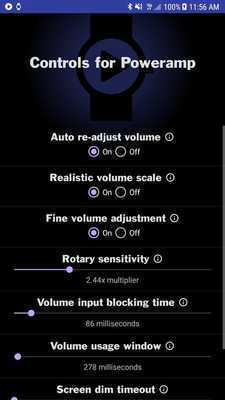
Download this app named Controls for Poweramp.
A simple Wearable 2.0 app designed specifically for round-display smartwatches with a rotary.Let your rotary on your watch be like an analog volume wheel!
Adjust the volume by simply scrolling the rotary when the app is being displayed.
The volume allows for fine-adjustment rather than the usual 15-step volume slider the Android System uses by changing the pre-amp in the equalizer for Poweramp.
This makes for an "anolog-like" volume wheel.
Displays Artist and Track title, as well as the volume in a round progress bar on the edge of the screen.
Tap the play, pause, skip next, skip previous buttons to control playback.
Tap the repeat icon to cycle through Repeat-All, Repeat-Song, and Off.
Tap the shuffle icon to toggle Shuffle-List and Off.
Tap the microphone icon to get Speech-To-Text search-and-play on Poweramp.
The watch will vibrate when it has started listening, and you can tap it again to make it stop and generate a search, or let it finish on its own.
It will be displayed as a bright red, full microphone icon when it is listening or being used.
The searches are as follows:
[play] [category] <keywords>
<keywords> are required.
They are the keyword to search for.
These keywords display results exactly as you'd see them if you did a library search in Poweramp.
[play] and [category] are optional keywords.
"Play" is implied, so it is not necessary to be said.
[category] can be replaced with one of the following:
Artist
Album
Composer
Playlist
Song
Example voice search-and-play queries:
"Artist Porcupine Tree"
This will play a list of all files with Steven Wilson listed as an Artist in your Poweramp library.
"Artist Link"
This is a clever trick to get it to recognize the "link" in linkin park.
Because Linkin isn't a real word, the speech recognizer may not pick it up correctly.
"Album Continuum"
This will play the the first album it finds matching the keyword "Continuum".
The library-search can only play one category at a time.
If you'd like to play everything it finds, you can try using the "Song" category.
It will search for categories in this order if none are specified: Album, Song, Artist, Playlist, Composer.
Updates:
This is not a standalone wearable 2.0 app.You must have the phone app installed for this to work properly, as well as Poweramp.
Free download Android Controls for Poweramp from MyAndroid.net
MyAndroid is not a downloader online for Controls for Poweramp. It only allows to test online Controls for Poweramp with apkid controls.for.poweramp. MyAndroid provides the official Google Play Store to run Controls for Poweramp online.
