
We provide Aurora Keyboard Theme online (apkid: aurora.keyboard.theme) in order to run this application in our online Android emulator.
Description:
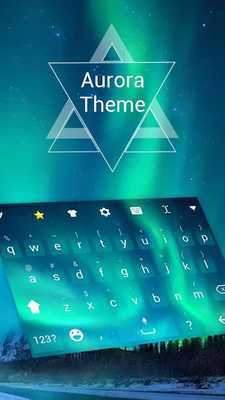
Download this app named Aurora Keyboard Theme.
New Free Aurora keyboard theme will bring your keyboard & text input a real new look & feel.Aurora keyboard theme is the most distinctive and classic water keyboard theme.Aurora keyboard will make your device look amazing! Download Aurora keyboard and Aurora skin, Aurorakeyboard background, and Aurora keyboard with amazing features.
Aurora keyboard only works with other keyboard installed on your phone!
Aurora Keyboard Theme will bring your android phone a new look.
Youâll fall in love with this AURORA Keyboard Theme for sure.
Aurora Keyboard Theme will let a plain keyboard into a beautiful and unique one.
Decorate your phone with Aurora Keyboard Theme now!
If you want to have a funny and special keyboard for your android phone, Aurora keyboard is definitely a must-have.
Aurora keyboard will let a plain keyboard into a beautiful and unique one.
How to use Aurora keyboard:
Note: You need to download Super Emoji Keyboard first.
1) Download Aurora keyboard and click the INSTALL.
2) Download Super Emoji Keyboard from the Google Play Store.
If you have already installed Super Emoji Keyboard, please click the "APPLY" button.
3) "Keyboard" (typewriter) installed and applied, Aurora keyboard will automatically install on the phone.
Super Emoji Keyboard Highlights:
MyAndroid is not a downloader online for Aurora Keyboard Theme. It only allows to test online Aurora Keyboard Theme with apkid aurora.keyboard.theme. MyAndroid provides the official Google Play Store to run Aurora Keyboard Theme online.
