
We provide AThaiID online (apkid: athaiid) in order to run this application in our online Android emulator.
Description:
Download this app named AThaiID.
HawkEye AThaiID : Thai National ID Card Viewer & Saving Android Application(Thai ID Smart Card Reader)
⢠Read and record data of Thai ID cards from mobile and tablet, don't need writing by hand.
⢠Used for card checking, such as age verification or illegal cards checking.
Features .
⢠Read Text and photo of the card holder 23 items.
⢠Read all version of Thai ID smart card, including the latest version .
⢠Work Offline, Internet / Wi-Fi are not required.
⢠Share and export all data to other apps such as Line, Facebook, e-mail and so on.
⢠Data will be saved automatically in five formats for reviewing later.
>>> Card image (JPG)
>>> Cardholder photographs (JPG).
>>> Text of card (TXT).
>>> Text of card with # delimited (TXT) (a specially formatted for programmers to work on).
>>> Database file (CSV) for using with Excel.
⢠Detect and alert when the conditions that are set forth, for example.
>>> Age (less than, equal to, from and beyond).
>>> Birthday.
>>> Card expired or less than specified number of days.
(e.g.
less than 30 days).
>>> A lifelong card.
>>> A fake card.
>>> Domiciled in or outside specified provinces.
>>> Gender
⢠Compatible with both USB and Bluetooth readers.
⢠Can name the Bluetooth reader.
Suitable for .
⢠Government, banks, enterprises, hospitals, police and others.
⢠Private agencies that want to check ID cards before providing services such as entertainment, business, insurance, direct sales and security.
⢠Use for public registrations, emplyee recruitment, outdoor events and others.
Card readers supported .
⢠TRA301BT (Bluetooth readers).
⢠TRA2910R (USB readers).
⢠TRA3310M2 (USB readers).
⢠TRAK2900R (USB readers).
⢠Please buy reader from http: //www.rd-comp.com.
How to use with Bluetooth reader.
1.
Pair Bluetooth reader with mobile phone.
- Press the power button of card reader.
Observe blue light flashing.
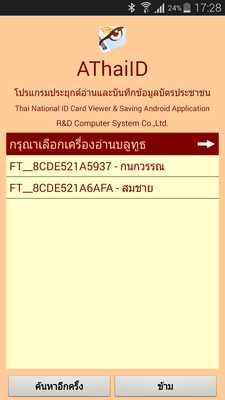
- From the mobile phone menu : Settings > Bluetooth > Scan > find reader name at the bottom line of the screen, start with "FT_" , then tap it.
- Tap Scan again if you can't find a reader.
2.
AThaiID using.
- Turn on the Bluetooth reader.
Observe blue light flashing or plug Micro-USB cable of USB reader to mobile phone's port.
- Tap AThaiID.
Try it free .
⢠Please load AThaiID from Google Play to try it.
You don't need a card reader for testing.
AThaiID Specification .
Supported ID card : Thai ID cards, up to current version.
Data from ID card: 23 items, including ID number, Thai title, Thai name, Thai middle name, Thai surname , English title, English name, English middle name, English last name, number, Moo, Trok, Soi, Thanon, sub - district, district, province, gender, date of birth, the agency that issued the card, date of issue, expiration date and photo.
Extra information: recording date and time, events, warnings, name and versions of apps, machine name, remarks and record 1-4.
Photos size : 297x355 pixels
The autosave files: text file (TXT), photo file (JPG), the card image files (JPG), text file (with # for programmers) (TXT), and database file (CSV).
Operating systems: Android 4.0 and up.
Precautions .
⢠For Android devices with Bluetooth 3.0 or higher.
⢠Using a USB reader device, Android must be compatible with OTG.
⢠An application may require communication with the server via the Internet in the first time it is installed or reader changing.
Updates:
Fix bugs
Free download Android AThaiID from MyAndroid.net
MyAndroid is not a downloader online for AThaiID. It only allows to test online AThaiID with apkid athaiid. MyAndroid provides the official Google Play Store to run AThaiID online.
