
We provide Remote AIO (Wifi / Usb) online (apkid: ainmatson.remote.hakim) in order to run this application in our online Android emulator.
Description:
Run this app named Remote AIO (Wifi / Usb) using MyAndroid.
You can do it using our Android online emulator.
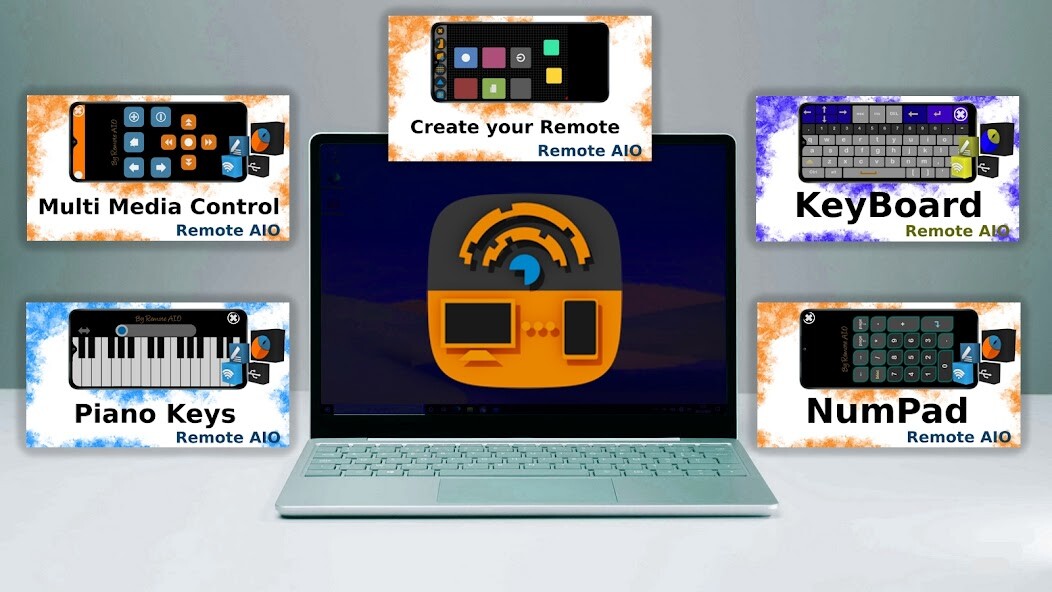
Transform your android device ,Smartphone, Tablet, Computer or Android TV into a wireless(wifi) mouse, keyboard ,touchpad,or piano keys for your computer.
Download Server DVL from https: //www.devallone.site
You can create your own Remote By adding the control buttons(more features) and connect each button with an event (keys)
it work's over WI-FI or usb connections ,server tool is easy to use ,it use UDP connection that making it rapidly (fast) an programmed by C#,making it as well as less consumption of the processor and memory (RAM) , it contains several features:
Easy server and app setup
detection automatic to easily find remotes on your network
more security
create your own remote using remote edition part (custom remotes)
mouse , keyboard , piano keys .
Screen Emulator (Screen Stream)+mouse controle
This enables you to control your PC through a local network connection
Compatible with Windows 7/8/10/11
Download & install server DVL from website https: //www.devallone.site
Make sure your phone and computer at the same network
Start app to connect one computer
Easy setup for Remote Control Client and Remote Control Server
Use your phone or tablet screen to control the thouchpad(mouse).
You can control the cursor by moving your finger over the screen along with the Mouse Buttons(left/right).
At the same time you can switch from touchpad Control to Keyboard or to Piano keys
If you are finding yourself in a situation where your PC keyboard or Touchpad stopped working or you just want to control the PC in an easier way, this is the remote control app that you are looking for.
Download Server : www.devallone.site
Download Server DVL from https: //www.devallone.site
You can create your own Remote By adding the control buttons(more features) and connect each button with an event (keys)
it work's over WI-FI or usb connections ,server tool is easy to use ,it use UDP connection that making it rapidly (fast) an programmed by C#,making it as well as less consumption of the processor and memory (RAM) , it contains several features:
Easy server and app setup
detection automatic to easily find remotes on your network
more security
create your own remote using remote edition part (custom remotes)
mouse , keyboard , piano keys .
Screen Emulator (Screen Stream)+mouse controle
This enables you to control your PC through a local network connection
Compatible with Windows 7/8/10/11
Download & install server DVL from website https: //www.devallone.site
Make sure your phone and computer at the same network
Start app to connect one computer
Easy setup for Remote Control Client and Remote Control Server
Use your phone or tablet screen to control the thouchpad(mouse).
You can control the cursor by moving your finger over the screen along with the Mouse Buttons(left/right).
At the same time you can switch from touchpad Control to Keyboard or to Piano keys
If you are finding yourself in a situation where your PC keyboard or Touchpad stopped working or you just want to control the PC in an easier way, this is the remote control app that you are looking for.
Download Server : www.devallone.site
MyAndroid is not a downloader online for Remote AIO (Wifi / Usb). It only allows to test online Remote AIO (Wifi / Usb) with apkid ainmatson.remote.hakim. MyAndroid provides the official Google Play Store to run Remote AIO (Wifi / Usb) online.
